As promised my progress blog.
http://10000hourcountdown.blogspot.co.uk/
For those that do not know, read my first article on the 10,000 hour theory then my second one on getting started again. I essentially have this 'outline plan' to become a master of computing by spending 10,000 hours of my free time studying Computer Science. To make the 10,000 hours measurable, in a way that can be contributed to human knowledge as a whole I set up the 'sister-blog' linked to above that is essentially a work diary, detailing what I studied for how long and a brief overview of what I learnt in that time period.

A Computer Science Blog sharing the best methods to go from being a standard muggle to a Computing Sorcerer.
Showing posts with label How Computers Work. Show all posts
Showing posts with label How Computers Work. Show all posts
Thursday, 24 January 2013

Thursday, 17 January 2013
10,000 Hours Re-visited
Click here to be linked back to the 'article that started it all'.
I am genuinely disappointed I stopped logging my progress with CS in relation to 10,000 hour time limit. I guess if I start again and consider it a type of social experiment on myself providing a kind of online diary detailing my hours as they go down over the next couple of years, almost like a dev blog but of a person, then it may provide some structure and a bit of evidence to what can be achieved with 5 years of your life.
I worked out the other day, assuming you're about 20 you have about 12 periods of five years left in you. Which if you consider that you have had about 4 of these periods so far, thats a long-cat long time.
As I'm sure a few of you know I study self-help books as well for another project I am working on and one of the most consistent messages that comes up in regards to making something of yourself is to 'always be working towards the big picture'. For instance you have always had an obsession with building finger boxes but you think oh I don't have time.. etc etc.. So instead of reading 'phat hoes magazine' on the way to work buy 'finger box boxers magazine', read it, make notes, study it! Keep gearing every little element of your life towards that big dream of yours. It gives your life real purpose to have a focus point, you can easily push through the mundane bullshit of day to day living much more contented than your fellow drones because you have a purpose, you are going to be the best finger box maker in the world, and sure whilst conditions may not be perfect now, you're making them perfect, you are doing what you can with what you have.
All motivational speeches aside the problem still remains to spend your time becoming a better finger box crafter and to become that master of the art that you envisage yourself to be you are going to have to put the hours in every day to get there. So thats where I am at, conditions are not perfect, work seven days a week, relatively no spare time but I have been inching forward. I veered off the pre-determined path of 'just study hardcore coding and become beast'.. That didn't work I fell at the first hurdle I found it too steep a learning curve so I had to go back a few steps and re-plan what I need to do.
THE RE-PLAN
The re-plan basically consisted of me re-evaluating the way my mind works and optimizing my work schedule around that. I found that my mind (probably due to computing) has become very used to immediate gratification. It wants to see something physical straight away and a long time studying theory is like death to my mind at this point. I therefore tried to find what is something that will give me coding experience but have a tangible, immediate outcome that's usable and still a productive use of my limited time. Website Design, is where I settled, it has all the elements my mind needs to settle into a routine. Its difficult enough to still be considered a challenge but is simple enough that I can get the results I want relatively quickly.
 With my new direction I had to incorporate it into my bigger 'overall' plan which is to become a 'master' of computer science (I appreciate, a ridiculously broad goal - but it will become clearer the closer I get to the goal I'm sure -_-). So I decided to take the 10,000 hours and break them up. Logically I would break them up into 1,000 hour sections. My first and only clear goal is to be able to create modern looking website with relative ease. So that is that 10,000 hours is the real goal. 1,000 hours is the day to day achievable goal.
I will create a main blog that details brief diary like entries that summarize what I learnt when I was learning every time that I sat down to learn. Taking off the minutes/hours of the total hours. So if any of you are interested in the day to day progress I am making watch this space as I will post a link to my diary blog here soon enough. My first major focus will be on website design so expect the majority of posts appearing on this blog for the next few months to be mainly on that theme, I will however mix it up where I can.
I am genuinely disappointed I stopped logging my progress with CS in relation to 10,000 hour time limit. I guess if I start again and consider it a type of social experiment on myself providing a kind of online diary detailing my hours as they go down over the next couple of years, almost like a dev blog but of a person, then it may provide some structure and a bit of evidence to what can be achieved with 5 years of your life.
I worked out the other day, assuming you're about 20 you have about 12 periods of five years left in you. Which if you consider that you have had about 4 of these periods so far, thats a long-cat long time.
As I'm sure a few of you know I study self-help books as well for another project I am working on and one of the most consistent messages that comes up in regards to making something of yourself is to 'always be working towards the big picture'. For instance you have always had an obsession with building finger boxes but you think oh I don't have time.. etc etc.. So instead of reading 'phat hoes magazine' on the way to work buy 'finger box boxers magazine', read it, make notes, study it! Keep gearing every little element of your life towards that big dream of yours. It gives your life real purpose to have a focus point, you can easily push through the mundane bullshit of day to day living much more contented than your fellow drones because you have a purpose, you are going to be the best finger box maker in the world, and sure whilst conditions may not be perfect now, you're making them perfect, you are doing what you can with what you have.
All motivational speeches aside the problem still remains to spend your time becoming a better finger box crafter and to become that master of the art that you envisage yourself to be you are going to have to put the hours in every day to get there. So thats where I am at, conditions are not perfect, work seven days a week, relatively no spare time but I have been inching forward. I veered off the pre-determined path of 'just study hardcore coding and become beast'.. That didn't work I fell at the first hurdle I found it too steep a learning curve so I had to go back a few steps and re-plan what I need to do.
THE RE-PLAN
The re-plan basically consisted of me re-evaluating the way my mind works and optimizing my work schedule around that. I found that my mind (probably due to computing) has become very used to immediate gratification. It wants to see something physical straight away and a long time studying theory is like death to my mind at this point. I therefore tried to find what is something that will give me coding experience but have a tangible, immediate outcome that's usable and still a productive use of my limited time. Website Design, is where I settled, it has all the elements my mind needs to settle into a routine. Its difficult enough to still be considered a challenge but is simple enough that I can get the results I want relatively quickly.
 With my new direction I had to incorporate it into my bigger 'overall' plan which is to become a 'master' of computer science (I appreciate, a ridiculously broad goal - but it will become clearer the closer I get to the goal I'm sure -_-). So I decided to take the 10,000 hours and break them up. Logically I would break them up into 1,000 hour sections. My first and only clear goal is to be able to create modern looking website with relative ease. So that is that 10,000 hours is the real goal. 1,000 hours is the day to day achievable goal.
I will create a main blog that details brief diary like entries that summarize what I learnt when I was learning every time that I sat down to learn. Taking off the minutes/hours of the total hours. So if any of you are interested in the day to day progress I am making watch this space as I will post a link to my diary blog here soon enough. My first major focus will be on website design so expect the majority of posts appearing on this blog for the next few months to be mainly on that theme, I will however mix it up where I can.
Wednesday, 12 December 2012
The Surrey Garden - My new website for gardeners in surrey
Hi Everyone as I'm sure most of you are aware I have practically stopped posting altogether on any of my blogs, for once I have a semi-just reason. I received a promotion at work and have had to learn so much about finance my brain is getting foggy. I also and considerably more interesting recently became a partner in my girl friends mother's small Gardening company. Being Winter it was a good time to associate myself with how the gardening industry works while its the 'down season'. I also threw up a quick website that I am now working on in my free time.
http://www.thesurreygarden.co.uk is the site if you want to check it out.
Essentially the company is a landscape garden design company based in Surrey, UK and is what I am to be focusing the majority of my time on. What is relevant to you the reader of this blog is, computing in relation to businesses. Particularly creating website from 'knowing nothing' to creating a SEO optimised revenue generating behemoth.
Anyhow expect more Html & SEO based posts in the near future.

http://www.thesurreygarden.co.uk is the site if you want to check it out.
Essentially the company is a landscape garden design company based in Surrey, UK and is what I am to be focusing the majority of my time on. What is relevant to you the reader of this blog is, computing in relation to businesses. Particularly creating website from 'knowing nothing' to creating a SEO optimised revenue generating behemoth.
Anyhow expect more Html & SEO based posts in the near future.

Work that the company did last year, as I'm sure you can agree very impressive.
Sunday, 28 October 2012
API - Application Programming Interface
The API is a term I have seen and heard a million times throughout my travels into the world of computer science and I always had a vague idea of its definition. I understood it mostly to be a kind of go-between for the user and a specific type of program.
Turns out I wasn't too far from the truth, an article I was recently reading summarised what the API is really well so I thought I'd share it with you.
Essentially the API is a set of pre-defined rules that programmers have to follow if they want their code to work on a certain application. For instance if you were on the web and you wanted to view a PDF file, you would have to have a 'plugin' that allows you to read PDFs within that browser. The programmer constructing that plugin however would of had to adhere to the rules set by that browser's API to create that functioning plugin.
APIs are literally everywhere, if you're using Windows right now you may notice how, in all the menus and boxes that come up the style of these interfaces are pretty much the same and that is due to the fact that Windows itself has a general API and again programmers wanting to create programs within windows will have to adhere to the pre-defined rules of that API, making all programs developed under that API have a similar feel.

So the next time you are considering writing code make sure you are aware of the API for the particular system you are trying to manipulate.
Turns out I wasn't too far from the truth, an article I was recently reading summarised what the API is really well so I thought I'd share it with you.
Essentially the API is a set of pre-defined rules that programmers have to follow if they want their code to work on a certain application. For instance if you were on the web and you wanted to view a PDF file, you would have to have a 'plugin' that allows you to read PDFs within that browser. The programmer constructing that plugin however would of had to adhere to the rules set by that browser's API to create that functioning plugin.
APIs are literally everywhere, if you're using Windows right now you may notice how, in all the menus and boxes that come up the style of these interfaces are pretty much the same and that is due to the fact that Windows itself has a general API and again programmers wanting to create programs within windows will have to adhere to the pre-defined rules of that API, making all programs developed under that API have a similar feel.
So the next time you are considering writing code make sure you are aware of the API for the particular system you are trying to manipulate.
Wednesday, 15 August 2012
The Von Neumann Model
The man you see before you is John von Neumann, an early computing pioneer. From what I've read so far I can establish that this guy is a pretty big cheese and is credited with the general model that computers are constructed by today. I plan to do a outline history of computing soon with all the major players and their contributions so if you were expecting an interesting article on all of von Neumann's contributions you will have to wait till I write that as this article is actually just an introduction to his 'model'.

John von Neumann
As far as writing about Neumann's life goes my knowledge of him is pretty slim at this moment in time, I will however, in the future plan to do an in-depth piece on him, for now however I am more concerned about his contribution to computer science and what that contribution means to me and you.
Essentially von Neumann established a model that computers should follow that was logical and effective in its design. This 5 part model describes the form your computer takes underneath all of its hardware and shiny cases.
Neumann states;
There are Five major components within the computer system:
The first is an Input Device
- This element sends data and information to the system. This information and data is then stored in the next component.
The Memory Unit
- The instructions and data are then processed by the next component.
The Aritmetic Logic Unit (ALU)
- The operation carried out within the ALU are carefully guided by the next component.
The Control Unit
- To which the results of the ALU and Control Unit's work is sent to the final component.
The Output Unit.
-Which would be your monitor or your printer.
This simplified breakdown of what a computer is made up of makes its a bit easier to grasp harder concepts in computer architecture as it allows you to picture in your heads the basic outline of the computers structure. This however is an unfinished model and if we were to add a bit of extra detail to make it a little more complete and a little bit more accurate to today's computing systems we would have to mention the System Bus Model.
As mentioned previously in another article (here) a bus is basically a method to quickly transport data from one component to another. The system bus model essentially partitions a computer into three sub-units:
CPU / MEMORY / I/O
These three sub units are the five units established in the von Neumann model only grouped by their purpose. This refinement of the von Neumann model combines the ALU and Control Unit into one functional unit - CPU. This model also combines the Input and Output units into a single I/O unit.
The system bus links all these components on a shared pathway made up of:
The Data Bus - Carries the information being transmitted
The Address Bus - Identifies where the information is being sent
The Control Bus - Describes aspects of how information is being send and in what manner
:)
-As I have mentioned previously I will update older articles as my understanding of the concepts within develops so if you find this a rather breif introduction to von Neumann and the basic form of the computer, do not worry I am learning all the time and will update when I have found anything considerable to add. If you have anything else you believe to be worthwhile drop us a comment and I'll add it in. Thanks.
Tuesday, 14 August 2012
The Spirit of Computing
An amazing quote about what computing should be for programmers;
``I think that it's extraordinarily important that we in computer science keep fun in computing. When it started out, it was an awful lot of fun. Of course, the paying customers got shafted every now and then, and after a while we began to take their complaints seriously. We began to feel as if we really were responsible for the successful, error-free perfect use of these machines. I don't think we are. I think we're responsible for stretching them, setting them off in new directions, and keeping fun in the house. I hope the field of computer science never loses its sense of fun. Above all, I hope we don't become missionaries. Don't feel as if you're Bible salesmen. The world has too many of those already. What you know about computing other people will learn. Don't feel as if the key to successful computing is only in your hands. What's in your hands, I think and hope, is intelligence: the ability to see the machine as more than when you were first led up to it, that you can make it more.''
Alan J. Perlis (April 1, 1922-February 7, 1990)

Friday, 10 August 2012
Advice from a Computing Professional
Not much to report by the way of personal progress, I've been giving in to my weak discipline again and playing Starcraft and DayZ all day. Wasted a potentially good day of learning so my technical hours still stand at 9,998/10,000. Which after three days is terrible and testament to the dangers of not heavily discipling your mind and your body when attempting any kind of 'me vs. the odds' type quest. Quite frankly its depressing to go from being so eager to for no conceivable reason being a lazy waste of time. Oh well this day is gone and I have tomorrow to redeem myself. Gotta be up really early for work so I plan to get some crunching of Computer Architecture in before work then hit it hard after work, maybe start exercising aswell as I can't be ignorant to the facts surrounding the saying 'healthy body, healthy mind'.
Sorry to disappoint you if you came today expecting something worth your while from me today, I have such terrible discipline. I suppose my crap discipline makes this quest all the more epic, if I ever finish it. For now anyway, some advice from someone who managed to get his head down and work his way up to a good position in a company.
Valuable advice if you are planning on entering into a computing career.
Enjoy -
"I've been hanging around here for a while and it seems to me like there's a lot of people on here who are still in school or are in the early stages of a career as a developer. I thought it would help some of you guys to have a thread where you can get the perspective of a long time software development leader about what we look for when hiring, promoting, etc.
As far as my credentials go, I won't say who I work for just that it's a massive company. I manage a team of 105 programmers working across ~40 project teams. Based on lines of code written my teams work in HTML/CSS/JavaScript, PHP, C#, Java and Python most often, with a bit of F#, Ruby and a few others I'm probably forgetting in there. I'm a 15 year vet, the majority of my team are guys who are just out of college or have a few years experience.
That said, here's my top 3 things you can do to get and keep a job:
1) Be Language Agnostic
When I'm hiring there's a 50% chance that I don't REALLY care what languages you've written in before, just that you're familiar with the language I need you in and can get up and running in general. Since most of our projects are short turn around items, onboarding takes a long time relative to how long the project will last (e.g. 3 weeks of onboarding on a 6 month project). Also, be flexible... I can't tell you how many college kids I just fucking walk out of my office because they tell me all about how Lisp is the greatest language ever invented and we're wrong to be using anything else, which brings me to point 2
2) Be Humble
That kid who tells me we should be using Lisp is wrong. You know how I know he's wrong? Because MY TEAM IS SUCCESSFUL. Again, I can't tell you how shockingly shitty most young guys act in that first interview. Obviously once you're on the team if you think we should switch something I ABSOLUTELY want to hear your idea but make sure it makes sense (and is demonstrably better) and don't get all butthurt if I don't agree. We work based on what the developers pitch to me and we decide as a group is the right play, which backs me into point 3
3) Remember that you're a fucking unicorn
You are the aberration here, your non technical managers, bosses, finance people, HR people, NOBODY in the company understands what the fuck it is you do. You may as well be named Merlin to these people. My job (to crib a line from Jay Mohr) is to not let management spook the thoroughbred. Your part in this is to be that thoroughbred AT ALL TIMES and to remember that a thoroughbred just KNOWS that it's a thoroughbred, when that belief is strong enough, other people will get it naturally. Carry yourself like a boss and you'll be a boss."

Remember, be the Unicorn :)
Thursday, 9 August 2012
Gentoomen - Giant book torrent
I did mention I needed to build up some relevant literature to start building up my knowledge base, so I found out about this 36G torrent that holds an impossibly massive libary on just computer science texts that cover every relevant subject imaginable. It truly is epic. I mean I have had it on download all day today, total of about 12 hours and it still has seven left and I have a average download speed of 1.1M, I appreciate that isn't massive but its not bad.


As far as general progress on my quest is going it is still very early days and I am currently finishing the How Computers Work book, so expect a full review shortly plus some extra recap notes and something a little more in-depth and technical.
A little list (9,998)
I'm currently coming to the end of the How Computers Work book by Ron White so decided to create a little list of a few terms that have always confused me when messing with my pc.
As I haven't ever really got into the nitty gritty of my computer before a lot of these terms are internet based as thats where I've had the most problems and run-ins with requests asking for things I didn't even realise my computer had.
(Also if any of these are wrong or just explained incorrectly do let me know and I'll do my best to fix them, enjoy)
Firstly something so important to the performance of your pc.
RAM
*n.b there is RAM and ROM (RAM is writeable ROM is not, I'll explain later)So yes RAM, Random Access Memory, RAM is a collection of microchips which the computer uses to store data and programs whilst it uses them. Writing is the process by which the computer stores data on RAM (Reading out of interest is when the computer transfers data or software code from RAM). The bigger the RAM capacity the better.

A picture of a ram, not a picture of ram
Clock speed and 'Overclocking'
Having browsed YouTube numerous time I occasionally stumble across random videos of some computer guy over clocking his Pc and showing various results, none of which I at the time appreciated. Essentially what 'over clockers' are doing is increasing the computer speed by 'hacking' its clock. The computer's clock is a microchip that regulates the timing and the speed of all computer functions. How it does this is by passing an alternating current through a Quartz crystal which responds with its own natural resonance (vibration), creating in turn another alternating current that is then sent through the computer allowing a processes to occur to the quartz rythm. Where it gets cool is that these crystals oscillate at a frequency measured in Mhz (my physics knowledge is very sub-par at the moment) which I had to find out means a million times a second. Now if you look at your computer's specs you will find you have a processer with a speed above 300Mhz sometime into the Ghz range, which means your processer can work with a speed of up to what ever frequency you have. Again, the higher the number the better.
Bus
I've found with computing the really complicated things that seem to be named really badly, are actually named really well sometimes quite comically by the people that created them, you just have to understand what they do. (reminds me, I'll do a post on getting to know computing jargon soon as its a very jargon heavy subject) Once such computing component is the Bus. There are buses everywhere in your computer, they are what they sound like a passengers vehicle only the passengers in this instance are bits of data not people. Essentially Buses are the circuitry and chips that manage the transfer of data from one device to another. The USB (Universal Serial BUS) drive you use is a bus, well it has a bus on it that connects whatever memory device attached to it to the computers hardware you just plugged it into.
DSL
Considering you are most probably connected via DSL right now or definitely have been in the past this one is one of those things you come across everyday without having any idea what it is. Luckily, its not complicated at all its more of a business acronym than a computing one. Digital Subscriber Line, what this means is that the 'line' you are using to connect to the internet right now is part of a digital circuit between your residency and a telephone company's central office allowing you access to high speed data transportation via exsisting twisted copper telephone lines. (technology has moved on a little bit since DSL but its still very relevant to most of us, including me)A Port
Similar again to a Bus, (in that its a metaphor) meaning any place in the computer where data is transferred, generally, a place where one device usually represented by a cable or wire is physically connected to another device. Imagine boats in a port, they bring something when they dock. There are two types of port, a Serial Port and a Parallel Port, the serial port only allows one bit of information to be sent at a time because only one wire of path is used for data, whereas parallel ports allow for several bits of data usually at least 8 bits simultaneously.
TCP/IP
I must of seen this acronym a million time and never payed it any attention, not realising that the only way I'm actually connected to the net right now is through TCP/IP. Transmission Control Protocol/Internet Protocol; it is actually a collection of methods used to connect servers on the internet and to exchange data. TCP/IP is a universal standard for connecting to the net.IP address
This goes hand in hand with TCP/IP, your IP address is an identifier for a computing dvice on a TCP/IP network. Networks using the TCP/IP route messages based on the IP address of the destination. The format of an IP address is a 32bit numeric address written as four number separated by periods. The numbers are between 0 and 255.Looking something like this.
XXX.XXX.XXX.XXX
There are a million and one ways to find your own IP address out, (click here) to let a website tell you yours.

Rasterizer
Something I've always wondered about but again never bothered to find out, little bit unrelated to the general theme but interesting nonetheless. A Rasterizer is the software used in games that translate 3D geometry of 3D objects into a two dimensional bitmap that can be displayed on your 2-D screen.
Wednesday, 8 August 2012
Someone has 'got the t-shirt'
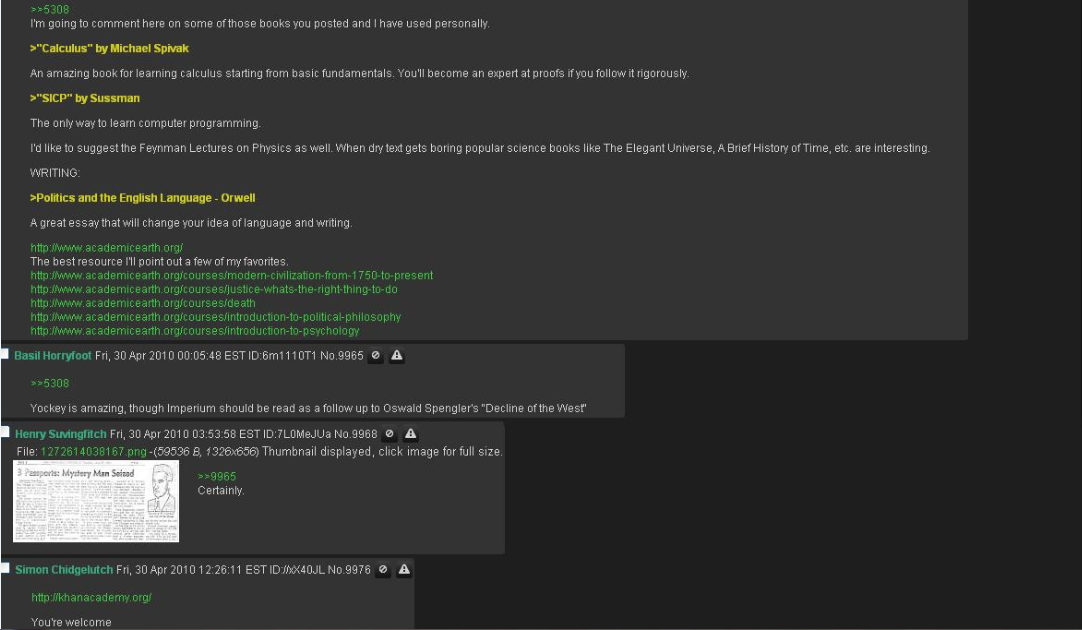
Well I was looking around for more advice and I found this 'reading list' set up by a guy who had a whole summer before starting univeristy in which to study and really accomplish something. This guy set out and went on a marathon reading session and essentially grounded himself in all areas of computer science (exactly what I am planning to do). The thread below is his recommendations to people in a thread, it eventually branches out into a huge which book for this subject, which book for that. This guy is a true autodidact.
 I do intend to copy exactly what he has done, but I intend to summarise what is to be gained from each book and try to teach you guys what I've learnt.
This thread is huge so click to expand it and have a good read, definitely worth it. Inspirational to.
I will post links to all these books in another post. For now back to Ron White.
Peace.
-Edit, seems there is a cap on the file size for one image, so I will post the whole picture, page length by page length below. Sorry about that.
Start- Enjoy


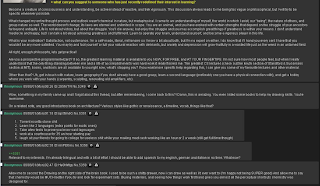


 END- :)

This thread is huge so click to expand it and have a good read, definitely worth it. Inspirational to.
I will post links to all these books in another post. For now back to Ron White.
Peace.
-Edit, seems there is a cap on the file size for one image, so I will post the whole picture, page length by page length below. Sorry about that.
Start- Enjoy




The Art of Assembly Language
As I mentioned previously I am going to start at well the start, which in this instance happens to be Assembly Language. After having a snoop around the net for some direction it seem thats the holy grail of Assembly Language knowledge is a massive book called the 'Art of Assembly Language'. (Link Below)
I had a quick flick through and have determined that it is in fact exactly what I was looking for, massively out of my depth but introduced well and progresses relatively fast. It seems well written and understandable enough to really push myself and break those barriers of mental stagnation. Currently I am still finishing Ron Whites book as I detailed in a previous post but once that is done I am going to start some practical Html Learning and spending at least 3 hours every day making my way through the art of assembly language.

Wish Me Luck.
Link To the Art of Assembly Language website:
http://www.plantation-productions.com/Webster/www.artofasm.com/index.html
I had a quick flick through and have determined that it is in fact exactly what I was looking for, massively out of my depth but introduced well and progresses relatively fast. It seems well written and understandable enough to really push myself and break those barriers of mental stagnation. Currently I am still finishing Ron Whites book as I detailed in a previous post but once that is done I am going to start some practical Html Learning and spending at least 3 hours every day making my way through the art of assembly language.

Wish Me Luck.
Link To the Art of Assembly Language website:
http://www.plantation-productions.com/Webster/www.artofasm.com/index.html
10,000 Hours left to go
"Since most of you are unemployed or students, you can easily spend 50 hours a week working on your skills in the field of your choice. If you did this, four years from now (e.g. the length of a college degree) you would be an expert in your chosen field. Literally, you would be ready to step up and become the next Steve Jobs, or Bill Gates, or crap out a PhD in mathematics, or be an awesome musician, or whatever.
Instead, you will spend the next 4 years racking up 10,000 hours of practice browsing internet forums. (Some of you will get the hours done in only two years). Think about what the last four years of that got you.
Now, what's your excuse for wasting your human potential?"

An epic post I found the other day that really encouraged me to do this.
As of today I will make a 10,000 Hours milestone, tallying each day my accumulated hours and put to the test the authenticity of the 10,000 hours mastery theory.
Monday, 6 August 2012
How Computers Work; Ron White
I recently purchased the highly recommended 'How Computers Work' by Ron White. Having only read about 100 pages in, I am currently in no position to write a full book review I can however recommend this title to anyone interested in any element of computing from hardcore low-level binary operation to how a mouse works, every area is tackled and is approached in a heavily illustrated manner making it a gentle ease into the world of computing.

How Computers Work, Ron White
Friday, 29 June 2012
Bucky tutorials
I'm to be starting an OU degree soon in computer science until then I am tutoring myself through Bucky Robert's site:

For those of you that do not know who Bucky Roberts is, he is a YouTube educator that runs you through the basics of pretty much every language out there as well as some other tutorials on random stuff like how to make a go-kart from scratch and how to survive in the wild. The guy is extremely engaging and really simplifies the basic of computer programming, a real must for someone whos finding the languages of the coding world a little to alien.
To help keep the learning of Computer Science interesting I decided to adopt a cool side hobby in 'game design'. Being naively unaware of how much work and complicated computer practice goes into game design I went in search of a little help and stumbled upon another great YouTube educator 'BergZerg'.
BergZerg's YouTube channel 'BurgZergarcade' hosts a unity RPG Game tutorial which runs you step by step through the creation of a full RPG game. Its very basic in terms of visuals so don't be expecting to whip out the next WoW (as you'll soon find out how ridiculous an idea that is) but in terms of being introduce to the demands of game design it is amazing.
His actual site has the original videos and a few more on different topics so worth a quick nosey if you like his work.
^I find the combination of these two tutorials especially the newboston C# tutorials and the bergzerg game design tutorials, really allows you to understand the applications of the simple codes you learn and how they work in a wide variety of scenarios. If you are interested in game design regardless of age or experience I really recommend checking these both out.
Wednesday, 18 January 2012
Life 2.0
A user based documentary on Second life players.
http://www.putlocker.com/file/BDBD149C71AE0F6B#
I personally am not the biggest fan of Second Life but this documentary is for anyone who loves the internet as it really explores life's lastest dimension in so many brilliant ways. What should be a 'nerdy' documentary ends up becoming a very philosophically and emotionally challenging short film, you really do engage with the users and their lives for a short time draw parallels to your own. Definitely worth a watch.
Its main themes surround addictions, affairs, exploring sub-conscious feelings, ignoring real-life, the losers, the winners and the business of the second life world. It also poses many interesting philosophical questions about reality.

Tell me if the link goes down, I'll find a new one. :)
http://www.putlocker.com/file/BDBD149C71AE0F6B#
I personally am not the biggest fan of Second Life but this documentary is for anyone who loves the internet as it really explores life's lastest dimension in so many brilliant ways. What should be a 'nerdy' documentary ends up becoming a very philosophically and emotionally challenging short film, you really do engage with the users and their lives for a short time draw parallels to your own. Definitely worth a watch.
Its main themes surround addictions, affairs, exploring sub-conscious feelings, ignoring real-life, the losers, the winners and the business of the second life world. It also poses many interesting philosophical questions about reality.

Tell me if the link goes down, I'll find a new one. :)
Thursday, 5 January 2012
Creating the foundations
I want to become a certified Computing Master.
I want to become a certified Computing Master because I am currently a very underachieving, undisciplined, average Joe that has a decent enough mind to understand everything I apply that mind to but consistently wastes his potential and has no shortage of people telling him he is doing so. I decided I need to break my pointless cyclical lifestyle and have made the choice to do something that will make me or break me as a human.(Well maybe not break me physically but you get the idea; something that if I don't reach it I will be a serious failure to myself). So I had a look around the world I live in and picked one of the hardest yet useful skills available to me and decided as both a personal/spiritual quest to accomplish something that right now would seem impossible; 'earning a Phd in Computer Science within the next decade'. Whilst in ten years this may not seem like an impossible challenge, for me, being a lazy normal guy that never was considered anything special academically, this is a big mountain to climb.
I feel I have the motivation, in that I have been feeling pumped to do this for at least a year (an example of how bad my discipline is, thinking something and wanting something for a whole year without ever properly acting on it) I have decided now to kick myself into gear and start doing it.
Obviously I am aware of time and realise that to achieve something like this I need to put every spare hour under the sun to productive use if I am to be anywhere near my goal within the time limit set. I need a big plan, like a check-list of everything developed so far in the field so that I don't just 'get a Phd.' but really contribute something incredibly useful for the human race as a whole.
To be a certified Computing Master.

So I am going to develop this blog as a progress blog, documenting where I am at, where I am going and to summarize all the knowledge gained so far on my journey. Also I want it to be another example to people that extraordinary people are just normal people that never gave up.
I like that last line, think I might get it tattoed on my face.
I want to become a certified Computing Master because I am currently a very underachieving, undisciplined, average Joe that has a decent enough mind to understand everything I apply that mind to but consistently wastes his potential and has no shortage of people telling him he is doing so. I decided I need to break my pointless cyclical lifestyle and have made the choice to do something that will make me or break me as a human.(Well maybe not break me physically but you get the idea; something that if I don't reach it I will be a serious failure to myself). So I had a look around the world I live in and picked one of the hardest yet useful skills available to me and decided as both a personal/spiritual quest to accomplish something that right now would seem impossible; 'earning a Phd in Computer Science within the next decade'. Whilst in ten years this may not seem like an impossible challenge, for me, being a lazy normal guy that never was considered anything special academically, this is a big mountain to climb.
I feel I have the motivation, in that I have been feeling pumped to do this for at least a year (an example of how bad my discipline is, thinking something and wanting something for a whole year without ever properly acting on it) I have decided now to kick myself into gear and start doing it.
Obviously I am aware of time and realise that to achieve something like this I need to put every spare hour under the sun to productive use if I am to be anywhere near my goal within the time limit set. I need a big plan, like a check-list of everything developed so far in the field so that I don't just 'get a Phd.' but really contribute something incredibly useful for the human race as a whole.
To be a certified Computing Master.

So I am going to develop this blog as a progress blog, documenting where I am at, where I am going and to summarize all the knowledge gained so far on my journey. Also I want it to be another example to people that extraordinary people are just normal people that never gave up.
I like that last line, think I might get it tattoed on my face.
Subscribe to:
Posts (Atom)