Showing posts with label code. Show all posts

Tuesday, 8 January 2013

What is a float? - A float is a term that is constantly over complicated.


 A float was something that used to really puzzle me. It was never properly explained on the video tutorials I used to follow when trying to pick up C. It used to constantly stump me and every definition I ever looked at just over-complicated the matter even further. For anyone else who is also baffled by a float, your misery ends below.

 A float is literally just a number with a decimal point... Thats it.


The term float is an abbreviation of a floating point number. Floating point refers to the decimal point being able to 'float' between the digits of a number being defined. Simple really but if you follow the Wikipedia link you will see how unnecessarily over-the-top their definition becomes... well I take that back their definition is very precise and proper its just very hard to understand if you don't have a good backing in mathematics, which we all (aspiring computer scientists) should really have.


yep...

 Just a little bit more information from me that I believe will help you; an integer can only hold single values and the way an integer is stored in your computers memory is different from a decimal number. A number with a decimal point is slightly more complicated to store and it therefore requires more space in the computer's memory than a plain integer. If you are trying to make efficient programs a little tip I learnt is that floats take up a a fair bit more memory in comparison to an integer so if every byte counts try and use integers rather than floats. Peace out and best of luck for your studying this year.

Wednesday, 12 December 2012

Everyone knows we all got into computing to make games


READ THIS:

http://news.quelsolaar.com/#post45

Awesome read from a one-man army that built an MMO in his spare time from scratch ON HIS OWN. The article attached discusses some of his tips from his personal blog. This guy is an absolute boss and as with most people that perform incredible feats of personal achievement happens to be a wise character.

Wednesday, 24 October 2012

To Catch A Shooting Star

As I am starting to get back into computing after my break with it to learn about and solidfy personal discipline I came across an article that clarified something that used to puzzle me so much when 'playing around' with coding.

 I always struggled with the fact that once a process produced its outcome, say 5+5, the answer would be produced and the program would either close or go onto its next process seemingly destroying the outcome of the previous process. Well it turns out this is to do with the fact that computers only do what they are told and if you told them to add '5+5', that's exactly what they are going to do. You didn't ask them to save that outcome so they obviously are not going to do that for you. What you have to do however is 'Catch a Shooting Star'. The shooting Star in this instance being the outcome from the process that is going to blink up on your screen then just disappear. To save this shooting star you have to hold on to it, hold on to it by storing it as a Variable. 

 Hopefully this produced one of those 'ohhhhhh yeah, of course' moments to you as it did me'. Knowing that if I want anything to continue existing in computing it has to be stored makes a huge difference to the way I view programming and I am feeling far more confident about not being confused about why my 'programs' would just blink up and then disappear. One thing that still puzzles me however is where does that '25' (from the '5+5' example) go, is it just erased?, was it ever stored?. 


 Anyway I hope this provides a little bit more clarity to understanding programming as it did for me.


Monday, 22 October 2012

How To Become a Hacker

Amazing article posted on the 420chan thread; the article discusses the mindset behind being a hacker and gives you a good insight into why most people bothered with computing in the first place. This has definitely re-kindled the fires of learning and has given me another positive reason to get heavily involved in the computing community.

Hopefully this will do the same for you.


As far as personal progress has been going I have started to create a diet and fitness regime that creates optimal conditions for the brain to function effectively. I am writing up the best tips and tricks that I have learned recently and will be posting them in here soon enough.

 On a final note there has been a lot of talk regarding an online meeting place where we can also go and share info and progress etc.. In essence a hacking circle. I will be creating a Facebook group and posting the link on here and the 420 thread so if you are interested in joining up and sharing your experience watch this space.
 (Just Posted a link in the latest article, in case you missed it: https://www.facebook.com/groups/360250364063011/)


Tuesday, 14 August 2012

The Spirit of Computing


An amazing quote about what computing should be for programmers;

``I think that it's extraordinarily important that we in computer science keep fun in computing. When it started out, it was an awful lot of fun. Of course, the paying customers got shafted every now and then, and after a while we began to take their complaints seriously. We began to feel as if we really were responsible for the successful, error-free perfect use of these machines. I don't think we are. I think we're responsible for stretching them, setting them off in new directions, and keeping fun in the house. I hope the field of computer science never loses its sense of fun. Above all, I hope we don't become missionaries. Don't feel as if you're Bible salesmen. The world has too many of those already. What you know about computing other people will learn. Don't feel as if the key to successful computing is only in your hands. What's in your hands, I think and hope, is intelligence: the ability to see the machine as more than when you were first led up to it, that you can make it more.''


Alan J. Perlis (April 1, 1922-February 7, 1990)


Thursday, 9 August 2012

Gentoomen - Giant book torrent

I did mention I needed to build up some relevant literature to start building up my knowledge base, so I found out about this 36G torrent that holds an impossibly massive libary on just computer science texts that cover every relevant subject imaginable. It truly is epic. I mean I have had it on download all day today, total of about 12 hours and it still has seven left and I have a average download speed of 1.1M, I appreciate that isn't massive but its not bad.


As far as general progress on my quest is going it is still very early days and I am currently finishing the How Computers Work book, so expect a full review shortly plus some extra recap notes and something a little more in-depth and technical. 

A little list (9,998)

Okay, So about 2 'official' hours in, hence the 9,998. Still feeling good about doing this.

 I'm currently coming to the end of the How Computers Work book by Ron White so decided to create a little list of a few terms that have always confused me when messing with my pc.

 As I haven't ever really got into the nitty gritty of my computer before a lot of these terms are internet based as thats where I've had the most problems and run-ins with requests asking for things I didn't even realise my computer had.

(Also if any of these are wrong or just explained incorrectly do let me know and I'll do my best to fix them, enjoy)

 Firstly something so important to the performance of your pc.

 RAM

 *n.b there is RAM and ROM (RAM is writeable ROM is not, I'll explain later)
 So yes RAM, Random Access Memory, RAM is a collection of microchips which the computer uses to store data and programs whilst it uses them. Writing is the process by which the computer stores data on RAM (Reading out of interest is when the computer transfers data or software code from RAM). The bigger the RAM capacity the better.


A picture of a ram, not a picture of ram

Clock speed and 'Overclocking'

 Having browsed YouTube numerous time I occasionally stumble across random videos of some computer guy over clocking his Pc and showing various results, none of which I at the time appreciated. Essentially what 'over clockers' are doing is increasing the computer speed by 'hacking' its clock. The computer's clock is a microchip that regulates the timing and the speed of all computer functions. How it does this is by passing an alternating current through a Quartz crystal which responds with its own natural resonance (vibration), creating in turn another alternating current that is then sent through the computer allowing a processes to occur to the quartz rythm. Where it gets cool is that these crystals oscillate at a frequency measured in Mhz (my physics knowledge is very sub-par at the moment) which I had to find out means a million times a second. Now if you look at your computer's specs you will find you have a processer with a speed above 300Mhz sometime into the Ghz range, which means your processer can work with a speed of up to what ever frequency you have. Again, the higher the number the better.


Bus

 I've found with computing the really complicated things that seem to be named really badly, are actually named really well sometimes quite comically by the people that created them, you just have to understand what they do. (reminds me, I'll do a post on getting to know computing jargon soon as its a very jargon heavy subject) Once such computing component is the Bus. There are buses everywhere in your computer, they are what they sound like a passengers vehicle only the passengers in this instance are bits of data not people. Essentially Buses are the circuitry and chips that manage the transfer of data from one device to another. The USB (Universal Serial BUS) drive you use is a bus, well it has a bus on it that connects whatever memory device attached to it to the computers hardware you just plugged it into.


DSL

 Considering you are most probably connected via DSL right now or definitely have been in the past this one is one of those things you come across everyday without having any idea what it is. Luckily, its not complicated at all its more of a business acronym than a computing one. Digital Subscriber Line, what this means is that the 'line' you are using to connect to the internet right now is part of a digital circuit between your residency and a telephone company's central office allowing you access to high speed data transportation via exsisting twisted copper telephone lines. (technology has moved on a little bit since DSL but its still very relevant to most of us, including me)


A Port

Similar again to a Bus, (in that its a metaphor) meaning any place in the computer where data is transferred, generally, a place where one device usually represented by a cable or wire is physically connected to another device. Imagine boats in a port, they bring something when they dock. There are two types of port, a Serial Port and a Parallel Port, the serial port only allows one bit of information to be sent at a time because only one wire of path is used for data, whereas parallel ports allow for several bits of data usually at least 8 bits simultaneously.


TCP/IP

 I must of seen this acronym a million time and never payed it any attention, not realising that the only way I'm actually connected to the net right now is through TCP/IP. Transmission Control Protocol/Internet Protocol; it is actually a collection of methods used to connect servers on the internet and to exchange data. TCP/IP is a universal standard for connecting to the net.

IP address

This goes hand in hand with TCP/IP, your IP address is an identifier for a computing dvice on a TCP/IP network. Networks using the TCP/IP route messages based on the IP address of the destination. The format of an IP address is a 32bit numeric address written as four number separated by periods. The numbers are between 0 and 255.
 Looking something like this.

XXX.XXX.XXX.XXX

 There are a million and one ways to find your own IP address out, (click here) to let a website tell you yours.


Rasterizer

 Something I've always wondered about but again never bothered to find out, little bit unrelated to the general theme but interesting nonetheless. A Rasterizer is the software used in games that translate 3D geometry of 3D objects into a two dimensional bitmap that can be displayed on your 2-D screen.


Wednesday, 8 August 2012

Someone has 'got the t-shirt'

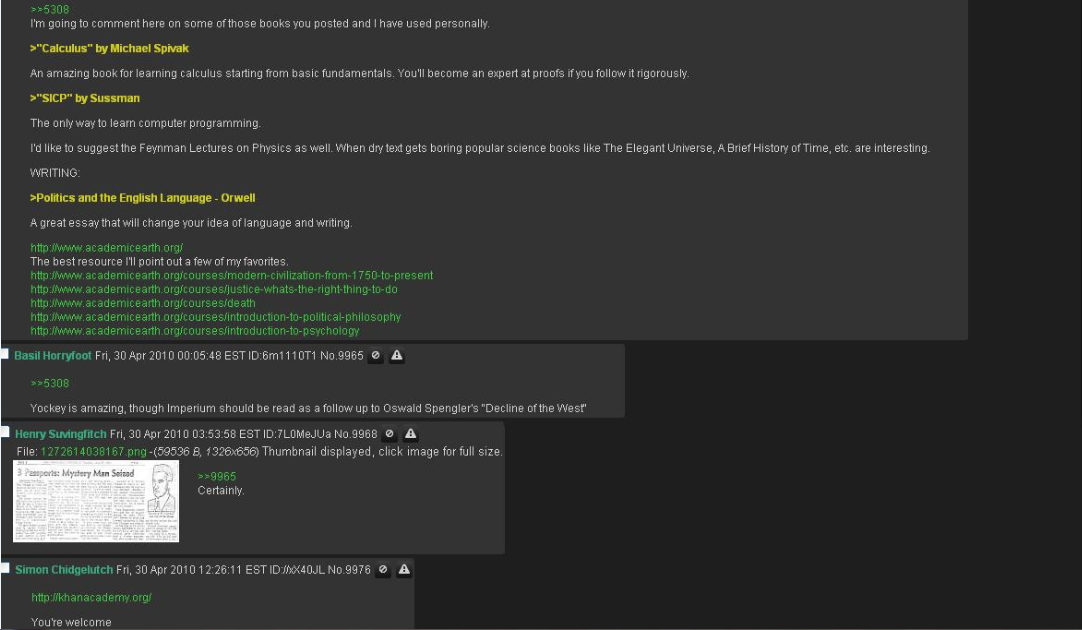
Well I was looking around for more advice and I found this 'reading list' set up by a guy who had a whole summer before starting univeristy in which to study and really accomplish something. This guy set out and went on a marathon reading session and essentially grounded himself in all areas of computer science (exactly what I am planning to do). The thread below is his recommendations to people in a thread, it eventually branches out into a huge which book for this subject, which book for that. This guy is a true autodidact.

 I do intend to copy exactly what he has done, but I intend to summarise what is to be gained from each book and try to teach you guys what I've learnt.

This thread is huge so click to expand it and have a good read, definitely worth it. Inspirational to.
 I will post links to all these books in another post. For now back to Ron White.
Peace.


-Edit, seems there is a cap on the file size for one image, so I will post the whole picture, page length by page length below. Sorry about that.

Start- Enjoy


END- :)

10,000 Hours left to go


"Since most of you are unemployed or students, you can easily spend 50 hours a week working on your skills in the field of your choice. If you did this, four years from now (e.g. the length of a college degree) you would be an expert in your chosen field. Literally, you would be ready to step up and become the next Steve Jobs, or Bill Gates, or crap out a PhD in mathematics, or be an awesome musician, or whatever.

Instead, you will spend the next 4 years racking up 10,000 hours of practice browsing internet forums. (Some of you will get the hours done in only two years). Think about what the last four years of that got you.

Now, what's your excuse for wasting your human potential?"


 An epic post I found the other day that really encouraged me to do this.


 As of today I will make a 10,000 Hours milestone, tallying each day my accumulated hours and put to the test the authenticity of the 10,000 hours mastery theory.


Tuesday, 7 August 2012

Day 1: Setting up a PoA (Plan of Action)

 Had a few very informative responses to the posts on 420chan about reccomendations for someone wanting to pursue a life mastering computing. Much appreciation for those responses.

 I found a timeless advice piece from a computing blogger who used to be a student of Computing at Yale. He offers a top 7 list of personal recommendations for anyone wanting to study computer science at a top-level.

http://www.joelonsoftware.com/articles/CollegeAdvice.html

His site is also very interesting to have a look around I will probably have another more serious look at his site when I have a bit more time.

 I'm still making my way through the 'How Computers Work' by Ron White book but have begun mapping out my PoA. Based on advice given in the posts (thanks again for that guys, especially big thanks to 'Basil Chuttingneg') I have decided to start my focused learning on assembly language.

 The reasoning behind this is :

  • Gets to grips with the 'real' computer part of computing
  • I will eventually be hindered by not knowing enough about assembly language and how compliers interact with the low level computer processes, so I am going to hit this hard now to make it a smoother ride later
  • Allows me eventually to have a massive advantage when developing my skills in 'C' and the similar languages due to a proper understanding of their functions interaction with the I/O devices of the computer


Obviously nobody learns an assembly language over night so instead of focusing soley on assembly language I've decided to make out of every day a 5hour 'practice' time. Within these 5 hours I intend to spend 3 of those hours learning assembly language from the ground up and 2 of those hour gaining practical experience in something instantly usuable such as xHtml and CSS. 

 I will be starting out by re-doing the Bucky Tutorials on xhtml and CSS, so expect a few posts about that coming soon.


Again guys thankyou very much for the pointers so far, if you have anymore advice or any personal experience you'd like to share i'll post the links to the 420 posts below.
http://boards.420chan.org/prog/res/24050.php   /PROG/
http://boards.420chan.org/tech/res/89403.php    /TECH/
http://boards.420chan.org/howto/res/30980.php /HOWTO/

Friday, 6 January 2012

Human reasoning errors

 Having been quite an introspective person naturally I began reading into how to improve cognition, basically make my mind more efficient. The main method through both experience and 'fact' is meditation (I use the term fact loosely as its in part borderline 'pseudo-scientific' claims and theories). I could rant and rave all day about the therapeutic benefits of mediation but this is a blog about computing so I'd recommend you to have a look up yourself, I think it helps sort your head out in all kinds of good ways.

 Back to the topic at hand, human reasoning errors, what I mean by this is how we make those super fast judgements and find alot of them to be massively wrong and some of them to be completely correct, with no seeming order to this process. So I went on an internet adventure exploring what is really going on when these weird processes happen with no seeming conscious control. It turns out conveniently enough that the mind is very similar to a computer in that it stores data based on past experience and relays them automatically to fit similar situations in the present. Sometimes this saves time sometimes it doesn't. This process is labelled under a subject known as Heuristics.

Incredibly interesting article explaining the reasoning behind heuristics and cognitive biases;


 A quick summary from this article; essentially the human brain has so much sensory input to handle that it has its own coping mechanisms which aid it in its daily function. The mechanisms are based, so we believe, on a kind of complex association system in which a certain action (e.g opening a door) is stored in the long term memory and when a similar scenario is encountered again for example reaching another door, the mind automatically assumes that this door must be like the 'door' object of previous encounters so the same principles are assumed to apply and the same action is therefore executed. Whilst this system is very economical and efficient it obviously has numerous limitations.


 An example demonstrated in the text is 'a group of people asked to work out a sum by way of a 5second guesstimate .The example shows just how we will engage our brains to apply previous rules and assumptions to the problem.

 The Question:
    Consider the product of the series:

9 x 8 x7 x 6 x 5 x 4 x3 x 2 x 1 = ?
vs.
1 x 2 x 3 x 4 x 5 x 6 x 7 x 8 x 9 = ?

 The typical answers: 

9*8*7*6*5*4*3*2*1 'usually comes out at an average of 4000'
however,
1*2*3*4*5*6*7*8*9 'usually comes out at around 500'

The actual answer is 362,880.

This very basic example shows just how the association function is sometimes limiting and how easy it is to engage it.
The article also explains the different categories of heuristic failure and when and how they are limiting. Examples such as logic assumptions and ignorance to statistics due to emotive association (terrorism vs cancer).

 Worth a re-read every now and then to avoid problem solving genercism as it will occasionally be defeatist.
Shown below is the cognitive process by which people are encouraged to avoid bias.


 If this doesnt make immediate sense, consult your mind in an introspective manner, or read the article

Thursday, 5 January 2012

Creating the foundations

I want to become a certified Computing Master.

I want to become a certified Computing Master because I am currently a very underachieving, undisciplined, average Joe that has a decent enough mind to understand everything I apply that mind to but consistently wastes his potential and has no shortage of people telling him he is doing so. I decided I need to break my pointless cyclical lifestyle and have made the choice to do something that will make me or break me as a human.(Well maybe not break me physically but you get the idea; something that if I don't reach it I will be a serious failure to myself). So I had a look around the world I live in and picked one of the hardest yet useful skills available to me and decided as both a personal/spiritual quest to accomplish something that right now would seem impossible; 'earning a Phd in Computer Science within the next decade'. Whilst in ten years this may not seem like an impossible challenge, for me, being a lazy normal guy that never was considered anything special academically, this is a big mountain to climb.

I feel I have the motivation, in that I have been feeling pumped to do this for at least a year (an example of how bad my discipline is, thinking something and wanting something for a whole year without ever properly acting on it) I have decided now to kick myself into gear and start doing it.

Obviously I am aware of time and realise that to achieve something like this I need to put every spare hour under the sun to productive use if I am to be anywhere near my goal within the time limit set. I need a big plan, like a check-list of everything developed so far in the field so that I don't just 'get a Phd.' but really contribute something incredibly useful for the human race as a whole.

To be a certified Computing Master.


So I am going to develop this blog as a progress blog, documenting where I am at, where I am going and to summarize all the knowledge gained so far on my journey. Also I want it to be another example to people that extraordinary people are just normal people that never gave up.

 I like that last line, think I might get it tattoed on my face.