Showing posts with label computing. Show all posts

Monday, 28 January 2013

Website Design Eureka!

For anyone that studies and practices webdesign, if you don't already know about what I am going to mention please prepare yourself for one of the most EUREKA! moments of your career so far.


 EVERYTHING IN HTML IS IN A BOX.


 If suddenly like me you get hit by a shit ton of 'aha!' bricks you will no doubt have a grin across your face as you can know create that border you wanted to create because you now understand that everything is just a box in a box in a box in a box.

Text is in its own box

Images are in a box

lines are in a box

Boxes are even in a box.


 If you don't get it study the image below and realise that these attributes can be applied to any element.


Enjoy!

Thursday, 24 January 2013

New Blog: http://10000hourcountdown.blogspot.co.uk/

As promised my progress blog.

http://10000hourcountdown.blogspot.co.uk/

For those that do not know, read my first article on the 10,000 hour theory then my second one on getting started again. I essentially have this 'outline plan' to become a master of computing by spending 10,000 hours of my free time studying Computer Science. To make the 10,000 hours measurable, in a way that can be contributed to human knowledge as a whole I set up the 'sister-blog' linked to above that is essentially a work diary, detailing what I studied for how long and a brief overview of what I learnt in that time period.


Thursday, 17 January 2013

10,000 Hours Re-visited

Click here to be linked back to the 'article that started it all'.

 I am genuinely disappointed I stopped logging my progress with CS in relation to 10,000 hour time limit. I guess if I start again and consider it a type of social experiment on myself providing a kind of online diary detailing my hours as they go down over the next couple of years, almost like a dev blog but of a person, then it may provide some structure and a bit of evidence to what can be achieved with 5 years of your life.

 I worked out the other day, assuming you're about 20 you have about 12 periods of five years left in you. Which if you consider that you have had about 4 of these periods so far, thats a long-cat long time.


 As I'm sure a few of you know I study self-help books as well for another project I am working on and one of the most consistent messages that comes up in regards to making something of yourself is to 'always be working towards the big picture'. For instance you have always had an obsession with building finger boxes but you think oh I don't have time.. etc etc.. So instead of reading 'phat hoes magazine' on the way to work buy 'finger box boxers magazine', read it, make notes, study it! Keep gearing every little element of your life towards that big dream of yours. It gives your life real purpose to have a focus point, you can easily push through the mundane bullshit of day to day living much more contented than your fellow drones because you have a purpose, you are going to be the best finger box maker in the world, and sure whilst conditions may not be perfect now, you're making them perfect, you are doing what you can with what you have.

 All motivational speeches aside the problem still remains to spend your time becoming a better finger box crafter and to become that master of the art that you envisage yourself to be you are going to have to put the hours in every day to get there. So thats where I am at, conditions are not perfect, work seven days a week, relatively no spare time but I have been inching forward. I veered off the pre-determined path of 'just study hardcore coding and become beast'.. That didn't work I fell at the first hurdle I found it too steep a learning curve so I had to go back a few steps and re-plan what I need to do.

 THE RE-PLAN

 The re-plan basically consisted of me re-evaluating the way my mind works and optimizing my work schedule around that. I found that my mind (probably due to computing) has become very used to immediate gratification. It wants to see something physical straight away and a long time studying theory is like death to my mind at this point. I therefore tried to find what is something that will give me coding experience but have a tangible, immediate outcome that's usable and still a productive use of my limited time. Website Design, is where I settled, it has all the elements my mind needs to settle into a routine. Its difficult enough to still be considered a challenge but is simple enough that I can get the results I want relatively quickly.

 With my new direction I had to incorporate it into my bigger 'overall' plan which is to become a 'master' of computer science (I appreciate, a ridiculously broad goal - but it will become clearer the closer I get to the goal I'm sure -_-). So I decided to take the 10,000 hours and break them up. Logically I would break them up into 1,000 hour sections. My first and only clear goal is to be able to create modern looking website with relative ease. So that is that 10,000 hours is the real goal. 1,000 hours is the day to day achievable goal.


 I will create a main blog that details brief diary like entries that summarize what I learnt when I was learning every time that I sat down to learn. Taking off the minutes/hours of the total hours. So if any of you are interested in the day to day progress I am making watch this space as I will post a link to my diary blog here soon enough. My first major focus will be on website design so expect the majority of posts appearing on this blog for the next few months to be mainly on that theme, I will however mix it up where I can.

Tuesday, 8 January 2013

What is a float? - A float is a term that is constantly over complicated.


 A float was something that used to really puzzle me. It was never properly explained on the video tutorials I used to follow when trying to pick up C. It used to constantly stump me and every definition I ever looked at just over-complicated the matter even further. For anyone else who is also baffled by a float, your misery ends below.

 A float is literally just a number with a decimal point... Thats it.


The term float is an abbreviation of a floating point number. Floating point refers to the decimal point being able to 'float' between the digits of a number being defined. Simple really but if you follow the Wikipedia link you will see how unnecessarily over-the-top their definition becomes... well I take that back their definition is very precise and proper its just very hard to understand if you don't have a good backing in mathematics, which we all (aspiring computer scientists) should really have.


yep...

 Just a little bit more information from me that I believe will help you; an integer can only hold single values and the way an integer is stored in your computers memory is different from a decimal number. A number with a decimal point is slightly more complicated to store and it therefore requires more space in the computer's memory than a plain integer. If you are trying to make efficient programs a little tip I learnt is that floats take up a a fair bit more memory in comparison to an integer so if every byte counts try and use integers rather than floats. Peace out and best of luck for your studying this year.

Monday, 7 January 2013

CSS is the reason your website sucks

 CSS (Cascading Style Sheets) have been something that I have been putting off learning when building and designing websites thus far. Honestly it has probably been like the biggest error of judgement on my part so far. I was fiddling trying to make semi-cool looking frames for about 2 weeks until I realized anything not relating directly to content is really the sole responsibility of CSS. If anyone is thinking of taking up website design (I highly recommend doing this) start with the basics of html then move to learning CSS as quick as possible it may save you about two weeks of your life.


 I will be posting how to make a basic CSS sheet that will allow you to create a visually impressive menu bar then a main frame on which to place your content. It took me too long messing around in HTML to get anywhere close to what would be considered a pretty old school looking site, I spent 1 hour this morning reading CSS on the train into work and figured out how to easily do what I had been racking my brain with over the last few weeks.

 Even though computing is frustrating when you reach those 'aha!' moments it becomes all worth it, so hang on in there and keep fighting the good fight.


Saturday, 22 December 2012

Well this guy has it all figured out..

For anyone who thinks they're fucked because they have a criminal record or just cant see themselves really progressing on the path they're are on. Read this: https://7chan.org/jew/res/387.html

Sort your life out.


I sure as hell am  will update you properly on my progress in CS and in life soon. For now peace and Happy Holidays

Sunday, 28 October 2012

API - Application Programming Interface

The API is a term I have seen and heard a million times throughout my travels into the world of computer science and I always had a vague idea of its definition. I understood it mostly to be a kind of go-between for the user and a specific type of program.

 Turns out I wasn't too far from the truth, an article I was recently reading summarised what the API is really well so I thought I'd share it with you.

 Essentially the API is a set of pre-defined rules that programmers have to follow if they want their code to work on a certain application. For instance if you were on the web and you wanted to view a PDF file, you would have to have a 'plugin' that allows you to read PDFs within that browser. The programmer constructing that plugin however would of had to adhere to the rules set by that browser's API to create that functioning plugin.

 APIs are literally everywhere, if you're using Windows right now you may notice how, in all the menus and boxes that come up the style of these interfaces are pretty much the same and that is due to the fact that Windows itself has a general API and again programmers wanting to create programs within windows will have to adhere to the pre-defined rules of that API, making all programs developed under that API have a similar feel.


 So the next time you are considering writing code make sure you are aware of the API for the particular system you are trying to manipulate.

Wednesday, 24 October 2012

To Catch A Shooting Star

As I am starting to get back into computing after my break with it to learn about and solidfy personal discipline I came across an article that clarified something that used to puzzle me so much when 'playing around' with coding.

 I always struggled with the fact that once a process produced its outcome, say 5+5, the answer would be produced and the program would either close or go onto its next process seemingly destroying the outcome of the previous process. Well it turns out this is to do with the fact that computers only do what they are told and if you told them to add '5+5', that's exactly what they are going to do. You didn't ask them to save that outcome so they obviously are not going to do that for you. What you have to do however is 'Catch a Shooting Star'. The shooting Star in this instance being the outcome from the process that is going to blink up on your screen then just disappear. To save this shooting star you have to hold on to it, hold on to it by storing it as a Variable. 

 Hopefully this produced one of those 'ohhhhhh yeah, of course' moments to you as it did me'. Knowing that if I want anything to continue existing in computing it has to be stored makes a huge difference to the way I view programming and I am feeling far more confident about not being confused about why my 'programs' would just blink up and then disappear. One thing that still puzzles me however is where does that '25' (from the '5+5' example) go, is it just erased?, was it ever stored?. 


 Anyway I hope this provides a little bit more clarity to understanding programming as it did for me.


Tuesday, 23 October 2012

Facebook Group for all self-teachers

There has been talk for quite a while discussing the need for a centralized group where everyone who wants to get involved in the process of teaching yourself computer science can meet and discuss progress, tips and tricks etc..

 So I took the liberty of setting up a quick Facebook group that serves that very function.


 Join up, post articles, suggestions, wisdom.

 Share the wealth.


o O o
o o O
OOO

Monday, 22 October 2012

How To Become a Hacker

Amazing article posted on the 420chan thread; the article discusses the mindset behind being a hacker and gives you a good insight into why most people bothered with computing in the first place. This has definitely re-kindled the fires of learning and has given me another positive reason to get heavily involved in the computing community.

Hopefully this will do the same for you.


As far as personal progress has been going I have started to create a diet and fitness regime that creates optimal conditions for the brain to function effectively. I am writing up the best tips and tricks that I have learned recently and will be posting them in here soon enough.

 On a final note there has been a lot of talk regarding an online meeting place where we can also go and share info and progress etc.. In essence a hacking circle. I will be creating a Facebook group and posting the link on here and the 420 thread so if you are interested in joining up and sharing your experience watch this space.
 (Just Posted a link in the latest article, in case you missed it: https://www.facebook.com/groups/360250364063011/)


Monday, 8 October 2012

Getting back on track

I appreciate a lot of readers who have visited this site will have been poorly disappointed with the quality and consistency of posts thus far, there is no real excuse for my lack of posting or personal progress bar not being disciplined. The initial realization I came to about this life project or spiritual quest was that I am obviously going to fail when I have terrible discipline and have never worked a real day of my life at improving my discipline. My one hope is that I do have a good work ethic once I can sit myself down to work. So needing a plan I had to evaluate what was my biggest problem or biggest source of procrastination problems was, the conclusion I quickly came to was that the overall problem is that I have too much free time in proportion to strength of will not to waste that free time. This realization coincided with me obtaining a second job.

Having got myself two jobs and now working 7days a week I have cut off my potential procrastination time by a huge amount, making the limited free time that I actually have in my day feel far more valuable. So far I have been working 7days a week for about a month and in that time, on the train to work and such I have read three relatively large 300+ page plus books on self-discipline. All of which I would highly recommend to read if you have similar problems to me. I would also recommend you read them in the order I did.


 The first book willpower gives you factual evidence as to the function of human willpower. A vastly entertaining book and incredibly useful as a guide to life. It discusses the role of blood sugar on every function of the human mind and how important it is for a person wanting to master themselves to be in complete control of their intake and the quality of the substances they ingest. Essentially it reaffirms that looking after yourself is so seriously important to your minds health.
 The second book Getting Things Done is referenced highly in Willpower and is a great immediate follow on from willpower, by no means is this book entertaining, it is quite dry and rightly so it is literally a hands on guide on how to get your life in order and keep it in order. It gives you brilliant models to handle any problems you may come  across throughout the day whilst allowing you simultaneously manage your daily to do lists that you will have synced up to your lifes purpose. Sounds weird, really isnt; another 5* self discipline book.
 The final book 7habits essentially elaborates on the two books and gives you real life applications for them as well as bringing your awareness to the responsibilities you have, being a conscious pro-active person to the communities immediately around you.

 I am now currently planning to read two books that discuss proper diet for establishing the mind. I will do small book reviews on these texts if they are relevant.

 The important thing now to note is that I am feeling confident that in the near future I will be on top of myself enough as a person to tackle the initial tasks I set myself. After having read a post today I am going to try and help establish a study group that will try to emulate this :http://www.scotthyoung.com/blog/. The start date for this project will be January 1 2013. Assuming the planet still exists and whatnot.

Wednesday, 15 August 2012

Introduction to Computer Memory

 Got an interesting link set to me from a friend concerning Computer Memory, apparently this text is THE text for understanding computer memory physically and theoretically. Obviously with memory being one of the most integral parts to programming I feel this has to be jumped to the top of my reading list.


 As I am currently following the lecture series at the moment I will start updating what I am picking up from this text, from the first few pages I read already, just 'flicking through' I know it is definitely worth my while and will give me a great advantage in the future when I begin to practice assembly language and any other low-levels tinkering I may have planned.

:)

First On-line Lecture. (9,996.5)

Managed to get on my discipline a bit more today and watched the first lecture in the series I promised I would watch daily. If you don't know what I am talking about (click here).


 Okay so firstly the lecture are a little bit dated but have a very cool old-school feel to them, that makes you feel as if you were there near to the beginning of the birth of the modern-modern computer (I'm talking post windows 95). The first lecture concentrates on introducing you to Lisp, not in a traditional 'declarative' way (picked that word up from the lectures, Gates watch out..) whereby the lecturer basically runs through the various commands and how you link them up, rather, in this lecture the theme is understanding what's inside the each process that each operator calls.

 The lectures are filled with useful quotes that help to put computing into perspective for the programmer. For instance the lecturer makes very clear at the beginning that computing shouldn't be considered a science or even considered computing as it takes away from the processes involved and focuses heavily on the tools you are using. I feel this quote does have some weight to it as he elaborate on it throughout the duration of the lecture and basically leaves you understanding that computing is not really about the fancy programs you get to play with right now for instance, computing for the computer scientist is about engineering an art form. Making something that is already magical and beautiful and making it even more so.

 Anyway enough about the lecturers philosophical input about what he feels computing to be, what is there to learn from the first lecture in this series. Well, enough to realise that if I stick with this and complete this series I will understand computing and programming in a seriously deep way. From all the dabbling I have done before in programming I understood more about what was actually going on from this hour long introductory lecture than I have done in a whole year of faffing around.


 The main concept the Lecture introduced was this idea of  'abstraction' in that the way you can express something in programming has to be understood fully by you for you to be able to do it efficiently. The lecturer went on to explain what he meant by this by creating a squaring function from scratch using Lisp. The details of how to do this are not important as he shows you many methods of producing the same result and even a mini program that was designed to 'guess' the square root of any number.

 The key points that needed to be taken away is the basic structure of code.
 He gives this example and then elaborates on it as I will giving a running commentary.

(+  3  17.4  5).
Lisp uses a system known as prefix notation which means the operator is written to the left of the operands.
 A simple mathematical operation in lisp. The plus sign (+) is the operator the numbers to be added are the operands (3, 17.4 & 5) and the parentheses/brackets including the process inside is known as a combination.

He then explains the method of developing your own code or in this case a squaring function.

(DEFINE SQUARE (LAMBDA x (* x x)))

Now I'm not 100% on the definition of LAMBDA but I have made a note to re-edit this section for clarity, until then I will just explain the point the lecturer was making by showing us this operation.

The intial call 'DEFINE' requires us to create a symbol we want defining, in this case as we are squaring numbers the symbol was 'SQUARE'. The next stage of this definition required us to call a procedure that allowed us to define using an 'argument' what we wanted  our definition to stand for. This is where the term 'LAMBDA' comes in and not knowing this did stump me a little bit on what was going on but it is not impossible to understand the essence of what is going on which was the purpose of this lecture. So, with a procedure called with an argument named 'x' ( what this essentially means is that a value known as x will be entered and when it is entered something must happen to this value due to the call SQUARE being used), a result has to be 'returned' to give purpose to the new definition. The final section of the code '(* x x)' required x to be multiplied by itself (or squared as it is known) to complete the process.


:)


 Again as with all articles I will touch them up for you to make them perfect as possible when my understanding of the concepts matures. Thanks again for your paitence. Also if you can help clarify any of the information I am trying to re-teach people please leave me a comment and I will be more than happy to fix the areas where I have gone wrong, its the reason I'm here. Also I did about 1.5 hours of actual constructive work today hence why I have moved from 9,998 to 9,996.5. It seems this process is going to balance on my fight with my discipline as in my mind its filled all the time with the want to learn computing but there is a huge part of me that hides away from tackling it, who knows for what reason, probably fear of not understanding something and being a failure unto myself and shattering the image I hold of myself being able to tackle anything with enough effort, which truth being told would be a devastating blow, it is however my sincerest intention to reach my goal of hitting a Phd in 10 years. I'm just off to a slow start. Again thank you for your patience.


The Von Neumann Model


The man you see before you is  John von Neumann, an early computing pioneer. From what I've read so far I can establish that this guy is a pretty big cheese and is credited with the general model that computers are constructed by today. I plan to do a outline history of computing soon with all the major players and their contributions so if you were expecting an interesting article on all of von Neumann's contributions you will have to wait till I write that as this article is actually just an introduction to his 'model'.


John von Neumann

As far as writing about Neumann's life goes my knowledge of him is pretty slim at this moment in time, I will however, in the future plan to do an in-depth piece on him, for now however I am more concerned about his contribution to computer science and what that contribution means to me and you.

 Essentially von Neumann established a model that computers should follow that was logical and effective in its design. This 5 part model describes the form your computer takes underneath all of its hardware and shiny cases.

 Neumann states;

 There are Five major components within the computer system:

 The first is an Input Device
              - This element sends data and information to the system. This information and data is then stored in the next component.

 The Memory Unit
              - The instructions and data are then processed by the next component.

The Aritmetic Logic Unit (ALU)
             - The operation carried out within the ALU are carefully guided by the next component.

The Control Unit
             - To which the results of the ALU and Control Unit's work is sent to the final component.

The Output Unit.
             -Which would be your monitor or your printer.


 This simplified breakdown of what a computer is made up of makes its a bit easier to grasp harder concepts in computer architecture as it allows you to picture in your heads the basic outline of the computers structure. This however is an unfinished model and if we were to add a bit of extra detail to make it a little more complete and a little bit more accurate to today's computing systems we would have to mention the System Bus Model.

  As mentioned previously in another article (here) a bus is basically a method to quickly transport data from one component to another. The system bus model essentially partitions a computer into three sub-units:
 CPU / MEMORY / I/O
These three sub units are the five units established in the von Neumann model only grouped by their purpose.  This refinement of the von Neumann model combines the ALU and Control Unit into one functional unit - CPU. This model also combines the Input and Output units into a single I/O unit.

 The system bus links all these components on a shared pathway made up of:
The Data Bus - Carries the information being transmitted
The Address Bus - Identifies where the information is being sent
The Control Bus - Describes aspects of how information is being send and in what manner

:)


-As I have mentioned previously I will update older articles as my understanding of the concepts within develops so if you find this a rather breif introduction to von Neumann and the basic form of the computer, do not worry I am learning all the time and will update when I have found anything considerable to add. If you have anything else you believe to be worthwhile drop us a comment and I'll add it in. Thanks.

Tuesday, 14 August 2012

Time to tick off those hours

I've decided that trying to tackle all of computer science in one go with no real structure for someone like me is incredibly futile so I am going to structure my learning around completing a series of online lectures. Obviously biting off more than I can chew left me escaping my responsibilities in a bubble of gaming and procrastination, so I am going to ease myself into a good cycle by forcing myself to watch just one lecture a day from a selected series. As I get more confident with myself I am going to up the pace, but for now I can manage just one video a day.

 As I have stated previously I am going to be starting with computer architecture and pad out the theoretical learning with practical experience in Assembly language. I have a layman's understanding of computer architecture but I would still consider myself a complete newbie to this topic area. With everything being essentially new I am going to take this slow and do one lecture then make sure I fully get it, summarise what I know into an interesting post, then tackle the next lecture.


 The Lecture series I am going to follow is an old one from 1996 but is recommended as a great introduction to computer architecture. It follows the book 'Structure and Interpretation of Computer Programs' - (The full book can be found here, for free). The sites description of the lectures is as follows;
- 'These twenty video lectures by Hal Abelson and Gerald Jay Sussman are a complete presentation of the course, given in July 1986 for Hewlett-Packard employees, and professionally produced by Hewlett-Packard Television. '


http://ocw.mit.edu/courses/electrical-engineering-and-computer-science/6-001-structure-and-interpretation-of-computer-programs-spring-2005/video-lectures/


The Spirit of Computing


An amazing quote about what computing should be for programmers;

``I think that it's extraordinarily important that we in computer science keep fun in computing. When it started out, it was an awful lot of fun. Of course, the paying customers got shafted every now and then, and after a while we began to take their complaints seriously. We began to feel as if we really were responsible for the successful, error-free perfect use of these machines. I don't think we are. I think we're responsible for stretching them, setting them off in new directions, and keeping fun in the house. I hope the field of computer science never loses its sense of fun. Above all, I hope we don't become missionaries. Don't feel as if you're Bible salesmen. The world has too many of those already. What you know about computing other people will learn. Don't feel as if the key to successful computing is only in your hands. What's in your hands, I think and hope, is intelligence: the ability to see the machine as more than when you were first led up to it, that you can make it more.''


Alan J. Perlis (April 1, 1922-February 7, 1990)


The Article that started it all.


If you enjoy what is being attempted the link below is the initial page where I got the idea and the logic behind the 10,000 hours.


Incase anyone was wondering what the hell has happened I've hit a major discipline low and have spent the last three days literally fucking around. I'm still on my 9,998 hours and still struggling to understand that floating point definition. 

 I am currently sucking hard. The intention is strong the discipline is not. 

I want this, I really do.


I'm going to start listening to this wolf.

Friday, 10 August 2012

Advice from a Computing Professional


Not much to report by the way of personal progress, I've been giving in to my weak discipline again and playing Starcraft and DayZ all day. Wasted a potentially good day of learning so my technical hours still stand at 9,998/10,000. Which after three days is terrible and testament to the dangers of not heavily discipling your mind and your body when attempting any kind of 'me vs. the odds' type quest. Quite frankly its depressing to go from being so eager to for no conceivable reason being a lazy waste of time. Oh well this day is gone and I have tomorrow to redeem myself. Gotta be up really early for work so I plan to get some crunching of Computer Architecture in before work then hit it hard after work, maybe start exercising aswell as I can't be ignorant to the facts surrounding the saying 'healthy body, healthy mind'.

 Sorry to disappoint you if you came today expecting something worth your while from me today, I have such terrible discipline. I suppose my crap discipline makes this quest all the more epic, if I ever finish it. For now anyway, some advice from someone who managed to get his head down and work his way up to a good position in a company.

 Valuable advice if you are planning on entering into a computing career.

Enjoy -

"I've been hanging around here for a while and it seems to me like there's a lot of people on here who are still in school or are in the early stages of a career as a developer. I thought it would help some of you guys to have a thread where you can get the perspective of a long time software development leader about what we look for when hiring, promoting, etc.

As far as my credentials go, I won't say who I work for just that it's a massive company. I manage a team of 105 programmers working across ~40 project teams. Based on lines of code written my teams work in HTML/CSS/JavaScript, PHP, C#, Java and Python most often, with a bit of F#, Ruby and a few others I'm probably forgetting in there. I'm a 15 year vet, the majority of my team are guys who are just out of college or have a few years experience.

That said, here's my top 3 things you can do to get and keep a job:

1) Be Language Agnostic
When I'm hiring there's a 50% chance that I don't REALLY care what languages you've written in before, just that you're familiar with the language I need you in and can get up and running in general. Since most of our projects are short turn around items, onboarding takes a long time relative to how long the project will last (e.g. 3 weeks of onboarding on a 6 month project). Also, be flexible... I can't tell you how many college kids I just fucking walk out of my office because they tell me all about how Lisp is the greatest language ever invented and we're wrong to be using anything else, which brings me to point 2

2) Be Humble
That kid who tells me we should be using Lisp is wrong. You know how I know he's wrong? Because MY TEAM IS SUCCESSFUL. Again, I can't tell you how shockingly shitty most young guys act in that first interview. Obviously once you're on the team if you think we should switch something I ABSOLUTELY want to hear your idea but make sure it makes sense (and is demonstrably better) and don't get all butthurt if I don't agree. We work based on what the developers pitch to me and we decide as a group is the right play, which backs me into point 3

3) Remember that you're a fucking unicorn
You are the aberration here, your non technical managers, bosses, finance people, HR people, NOBODY in the company understands what the fuck it is you do. You may as well be named Merlin to these people. My job (to crib a line from Jay Mohr) is to not let management spook the thoroughbred. Your part in this is to be that thoroughbred AT ALL TIMES and to remember that a thoroughbred just KNOWS that it's a thoroughbred, when that belief is strong enough, other people will get it naturally. Carry yourself like a boss and you'll be a boss."


Remember, be the Unicorn :)

Thursday, 9 August 2012

A little list (9,998)

Okay, So about 2 'official' hours in, hence the 9,998. Still feeling good about doing this.

 I'm currently coming to the end of the How Computers Work book by Ron White so decided to create a little list of a few terms that have always confused me when messing with my pc.

 As I haven't ever really got into the nitty gritty of my computer before a lot of these terms are internet based as thats where I've had the most problems and run-ins with requests asking for things I didn't even realise my computer had.

(Also if any of these are wrong or just explained incorrectly do let me know and I'll do my best to fix them, enjoy)

 Firstly something so important to the performance of your pc.

 RAM

 *n.b there is RAM and ROM (RAM is writeable ROM is not, I'll explain later)
 So yes RAM, Random Access Memory, RAM is a collection of microchips which the computer uses to store data and programs whilst it uses them. Writing is the process by which the computer stores data on RAM (Reading out of interest is when the computer transfers data or software code from RAM). The bigger the RAM capacity the better.


A picture of a ram, not a picture of ram

Clock speed and 'Overclocking'

 Having browsed YouTube numerous time I occasionally stumble across random videos of some computer guy over clocking his Pc and showing various results, none of which I at the time appreciated. Essentially what 'over clockers' are doing is increasing the computer speed by 'hacking' its clock. The computer's clock is a microchip that regulates the timing and the speed of all computer functions. How it does this is by passing an alternating current through a Quartz crystal which responds with its own natural resonance (vibration), creating in turn another alternating current that is then sent through the computer allowing a processes to occur to the quartz rythm. Where it gets cool is that these crystals oscillate at a frequency measured in Mhz (my physics knowledge is very sub-par at the moment) which I had to find out means a million times a second. Now if you look at your computer's specs you will find you have a processer with a speed above 300Mhz sometime into the Ghz range, which means your processer can work with a speed of up to what ever frequency you have. Again, the higher the number the better.


Bus

 I've found with computing the really complicated things that seem to be named really badly, are actually named really well sometimes quite comically by the people that created them, you just have to understand what they do. (reminds me, I'll do a post on getting to know computing jargon soon as its a very jargon heavy subject) Once such computing component is the Bus. There are buses everywhere in your computer, they are what they sound like a passengers vehicle only the passengers in this instance are bits of data not people. Essentially Buses are the circuitry and chips that manage the transfer of data from one device to another. The USB (Universal Serial BUS) drive you use is a bus, well it has a bus on it that connects whatever memory device attached to it to the computers hardware you just plugged it into.


DSL

 Considering you are most probably connected via DSL right now or definitely have been in the past this one is one of those things you come across everyday without having any idea what it is. Luckily, its not complicated at all its more of a business acronym than a computing one. Digital Subscriber Line, what this means is that the 'line' you are using to connect to the internet right now is part of a digital circuit between your residency and a telephone company's central office allowing you access to high speed data transportation via exsisting twisted copper telephone lines. (technology has moved on a little bit since DSL but its still very relevant to most of us, including me)


A Port

Similar again to a Bus, (in that its a metaphor) meaning any place in the computer where data is transferred, generally, a place where one device usually represented by a cable or wire is physically connected to another device. Imagine boats in a port, they bring something when they dock. There are two types of port, a Serial Port and a Parallel Port, the serial port only allows one bit of information to be sent at a time because only one wire of path is used for data, whereas parallel ports allow for several bits of data usually at least 8 bits simultaneously.


TCP/IP

 I must of seen this acronym a million time and never payed it any attention, not realising that the only way I'm actually connected to the net right now is through TCP/IP. Transmission Control Protocol/Internet Protocol; it is actually a collection of methods used to connect servers on the internet and to exchange data. TCP/IP is a universal standard for connecting to the net.

IP address

This goes hand in hand with TCP/IP, your IP address is an identifier for a computing dvice on a TCP/IP network. Networks using the TCP/IP route messages based on the IP address of the destination. The format of an IP address is a 32bit numeric address written as four number separated by periods. The numbers are between 0 and 255.
 Looking something like this.

XXX.XXX.XXX.XXX

 There are a million and one ways to find your own IP address out, (click here) to let a website tell you yours.


Rasterizer

 Something I've always wondered about but again never bothered to find out, little bit unrelated to the general theme but interesting nonetheless. A Rasterizer is the software used in games that translate 3D geometry of 3D objects into a two dimensional bitmap that can be displayed on your 2-D screen.


Wednesday, 8 August 2012

Someone has 'got the t-shirt'

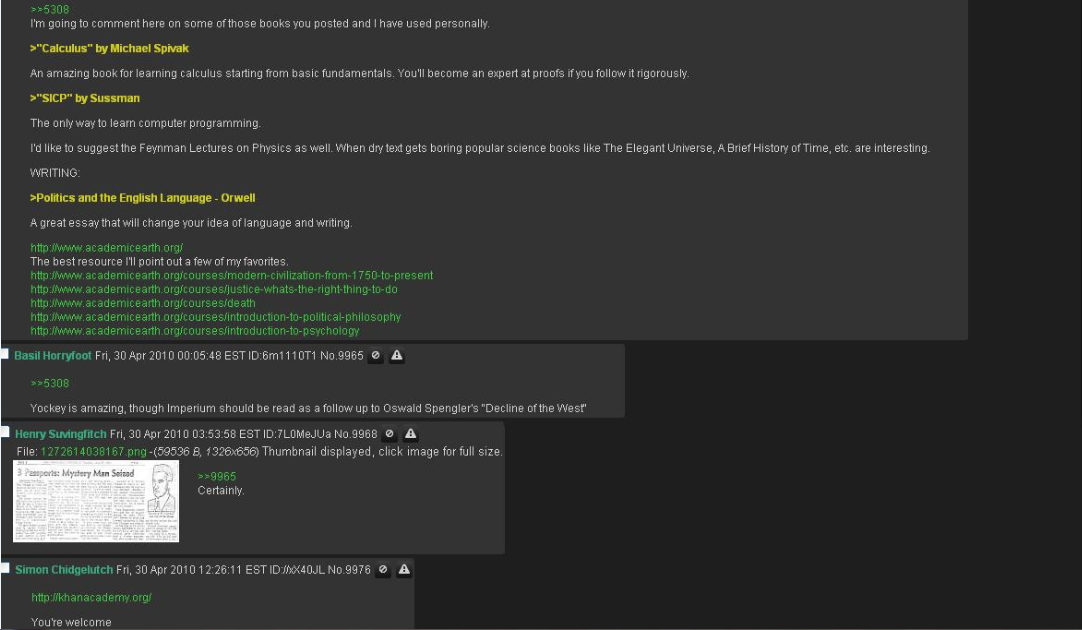
Well I was looking around for more advice and I found this 'reading list' set up by a guy who had a whole summer before starting univeristy in which to study and really accomplish something. This guy set out and went on a marathon reading session and essentially grounded himself in all areas of computer science (exactly what I am planning to do). The thread below is his recommendations to people in a thread, it eventually branches out into a huge which book for this subject, which book for that. This guy is a true autodidact.

 I do intend to copy exactly what he has done, but I intend to summarise what is to be gained from each book and try to teach you guys what I've learnt.

This thread is huge so click to expand it and have a good read, definitely worth it. Inspirational to.
 I will post links to all these books in another post. For now back to Ron White.
Peace.


-Edit, seems there is a cap on the file size for one image, so I will post the whole picture, page length by page length below. Sorry about that.

Start- Enjoy


END- :)